Configure and use an agent in chat
In ALIDA, an endpoint can be exposed for each agent. The BDA chat can be connected to multiple agents through these endpoints by using an environment variable that contains the relevant JSON configuration. Environment variables are set from the Personalization of Environment Variables panel.
What an agent is, and what it is not
An agent is an ALIDA Service, but not every Service can be used as an agent. A Service is usable as an agent when it has both of these characteristics:
- it is long-running: it stays up for the whole life of the workflow and keeps answering requests, instead of running once and terminating;
- it exposes REST ports: an invocation endpoint and, normally, a streaming endpoint, which the chat calls.
A normal batch Service, one that reads a dataset, transforms it and terminates, cannot be used as an agent, even though a workflow containing it has a URL. It does not stay running, and it does not speak the chat protocol. The same is true for a workflow that has already finished its execution.
The agents currently distributed with ALIDA are the OpenCode Agent and the ADK Agent. To use one, put it in a workflow, configure its ports, and start the workflow: the endpoints exist only while that workflow is running.
How to read the endpoint URL
The URL of a running agent looks like this:
https://alida.devng.alidalab.it/events/bda/11150/11152/v1
└──────────── instance ───────┘           └─┬─┘ └─┬─┘ └┬┘
                                            │     │    └── protocol suffix, OpenAI only
                                            │     └─────── id of the agent Service
└───────────── id of the running workflow (BDA)The two numbers are not values you choose or look up in a catalogue: they identify one specific agent inside one specific workflow execution. They change only when the workflow is edited or recreated: stopping and restarting the workflow without making changes does not change its ids. After an edit or a recreation, however, the configuration must be updated. Copy the URL from the Workflow Designer instead of writing it by hand, as described in Get the agent URLs.
Before you begin
Make sure you have:
- An agent running inside a workflow. The endpoints exist only while the workflow is running: an agent whose workflow has been stopped or deleted answers with
404 – bda-id <id> has not been initialized. - Access to the Workflow Designer of that workflow, to copy the endpoint URL.
- The API protocol exposed by the agent,
OpenCodeorOpenAI. - Access to the environment customization panel of the ALIDA instance, where the configuration is saved.
Instance-level configuration
The agent configuration is not per-user: it is written in the environment file of the ALIDA instance and is therefore shared by every user of that instance. Point it to a workflow that is meant to stay running, because if that workflow is stopped the agent stops working for everyone.
Get the agent URLs
Invocation URL (url)
The agent is invoked through a REST endpoint exposed by the workflow, exactly like any other REST API port. Open the workflow in the Workflow Designer, select the agent, and copy the URL of the endpoint by clicking on it in the panel on the right side.
Output storage of the port
Before the workflow is started, the port that exposes the endpoint must have an output storage of type Remote selected. Click on the dot representing the port on the agent, then choose an output storage of type Remote for it. If the output storage is not of this type, the workflow runs as a batch: it waits for the Service to terminate before moving on, but a long-running agent Service never terminates, so the workflow never reaches the point of exposing the endpoint.
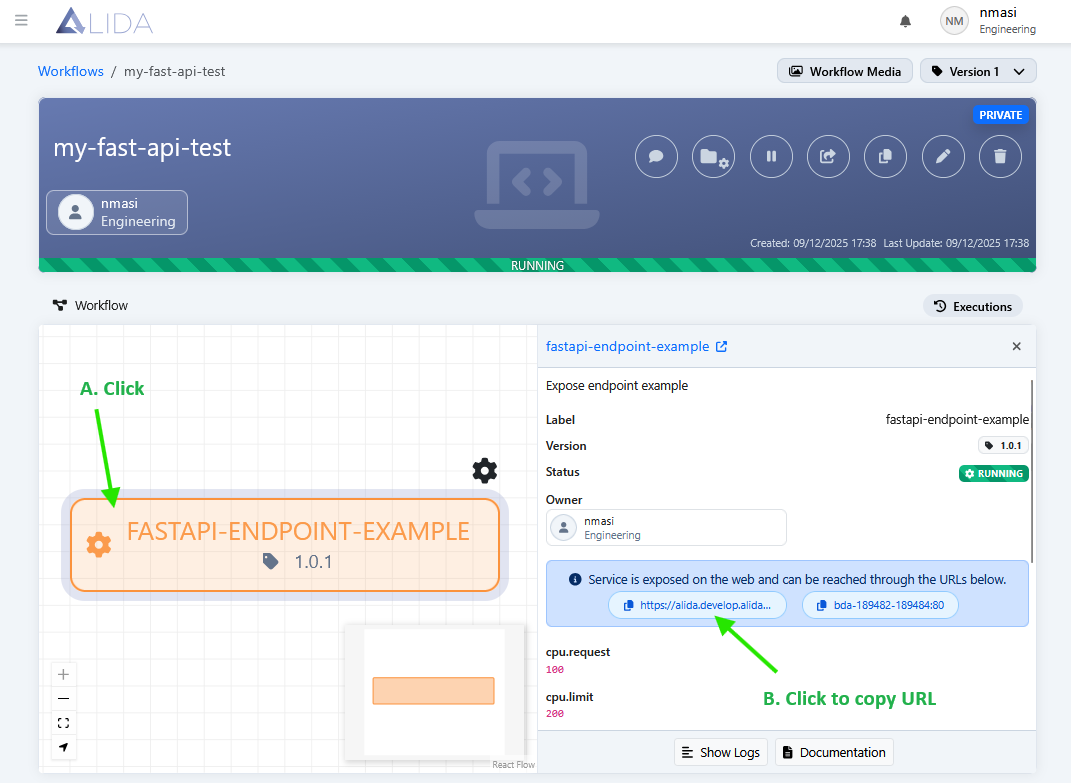
The copied URL has this form:
https://alida.devng.alidalab.it/events/bda/11150/11152For details on how ALIDA exposes and protects these endpoints, see I/O Ports: REST API endpoints.
OpenAI protocol
For an agent exposing OpenAI-compatible APIs, such as the ADK Agent, append /v1 to the copied URL:
https://alida.devng.alidalab.it/events/bda/11150/11152/v1Streaming URL (streamingUrl)
The streaming endpoint has no copy button in the Workflow Designer: build it from the copied URL by inserting streaming/ right after /events/bda/ and keeping the rest of the path unchanged.
Copied URL:    https://alida.devng.alidalab.it/events/bda/11150/11152
Streaming URL: https://alida.devng.alidalab.it/events/bda/streaming/11150/11152The /v1 suffix used for OpenAI-compatible invocation is not added to the streaming URL.
Write the configuration
The configuration is a JSON object saved in the environment file of the instance, from the panel described in Personalization of Environment Variables.
| Field | What to enter |
|---|---|
type | agent, to declare the entry as an agent of the chat. |
name | Free text. It is the name shown to the user when choosing the agent in the chat. |
url | The invocation URL copied from the Workflow Designer, with the /v1 suffix when the protocol is OpenAI. |
streamingUrl | The streaming URL derived from the copied URL, as described above. Leave it empty if the agent does not expose streaming. |
token | Leave empty (""): authentication of the logged-in user is handled by extra.queryParams. |
protocol | The protocol exposed by the agent: OpenCode for the OpenCode Agent, OpenAI for any agent with OpenAI-compatible APIs, such as the ADK Agent. |
contextPage | The list of ALIDA pages where the agent is available in chat, as {"path": "<page-path>"} entries, for example /services for the Services page. Leave the list empty to make the agent available on every ALIDA page. |
extra.queryParams | Additional request parameters. Keep "token": "NaN": the placeholder is replaced at runtime with the token of the logged-in user, which authenticates the call to the endpoint. |
The token placeholder is not an API key
This token is different from the Ollama or MLflow API key. It is the authentication token issued by the ALIDA platform for the logged-in user, used to authorize the calls between internal components — here, from the chat to the agent endpoint. Do not replace the placeholder with a key of your own: leave it as {{alida-token}}.
Configuration examples
In the examples below, replace the placeholders with the values of your running workflow: <bda-id> is the id of the running workflow (BDA), and <service-id> is the id of the Service of the agent you started — you find it in the Services section of that workflow. Rather than assembling the URL by hand, open the workflow in the Workflow Designer and copy the URL of the endpoint by clicking on it, as described in Get the agent URLs: the copied URL already contains both ids.
OpenCode
{
  "type": "agent",
  "name": "Custom Coding Agent",
  "url": "https://<alida-instance-url>/events/bda/<bda-id>/<service-id>",
  "streamingUrl": "https://<alida-instance-url>/events/bda/streaming/<bda-id>/<service-id>",
  "token": "",
  "protocol": "OpenCode",
  "contextPage": [
    {
      "path": "/services"
    }
  ],
  "extra": {
    "queryParams": {
      "token": "{{alida-token}}"
    }
  }
}OpenAI-compatible endpoint
Use this configuration for any agent that exposes OpenAI-compatible APIs. The ADK Agent is one agent that integrates this type of endpoint.
{
  "type": "agent",
  "name": "Alida Agent",
  "url": "https://<alida-instance-url>/events/bda/<bda-id>/<service-id>/v1",
  "streamingUrl": "https://<alida-instance-url>/events/bda/streaming/<bda-id>/<service-id>",
  "token": "",
  "protocol": "OpenAI",
  "contextPage": [
    {
      "path": "/services"
    }
  ],
  "extra": {
    "queryParams": {
      "token": "{{alida-token}}"
    }
  }
}The same configuration, filled in with the URLs copied from a running workflow, looks like this:
{
  "type": "agent",
  "name": "Alida Agent",
  "url": "https://alida.devng.alidalab.it/events/bda/11150/11152/v1",
  "streamingUrl": "https://alida.devng.alidalab.it/events/bda/streaming/11150/11152",
  "token": "",
  "protocol": "OpenAI",
  "contextPage": [
    {
      "path": "/services"
    }
  ],
  "extra": {
    "queryParams": {
      "token": "{{alida-token}}"
    }
  }
}First request
- Go to the page specified in
contextPage, for example/services. - Open chat, select the agent by the
namegiven in the configuration, and make a request appropriate to that context. - Verify the result before using or deploying the generated artifacts.
Troubleshooting
| Symptom | Cause and solution |
|---|---|
404 – bda-id <id> has not been initialized | The workflow that exposes the agent is not running, or the URL points to a workflow that no longer exists. Start the workflow and copy the URL again from the Workflow Designer. |
| The agent is not listed in chat | The current page is not among those declared in contextPage. Reach one of the declared pages, or leave contextPage empty to make the agent available everywhere. |
| The answer arrives all at once, or streaming fails | Check streamingUrl: streaming/ must follow /events/bda/, and the URL must not end with /v1. |
| The call is rejected as unauthorized | Check that extra.queryParams.token contains {{alida-token}} and that your user has the permissions to access the workflow that exposes the agent. |