OpenCode Agent
OpenCode is ALIDA's operational agent. It exposes APIs and SSE streaming, and can be specialized for a domain through a discovery dataset.
Inputs: datasets and MCP servers
TIP
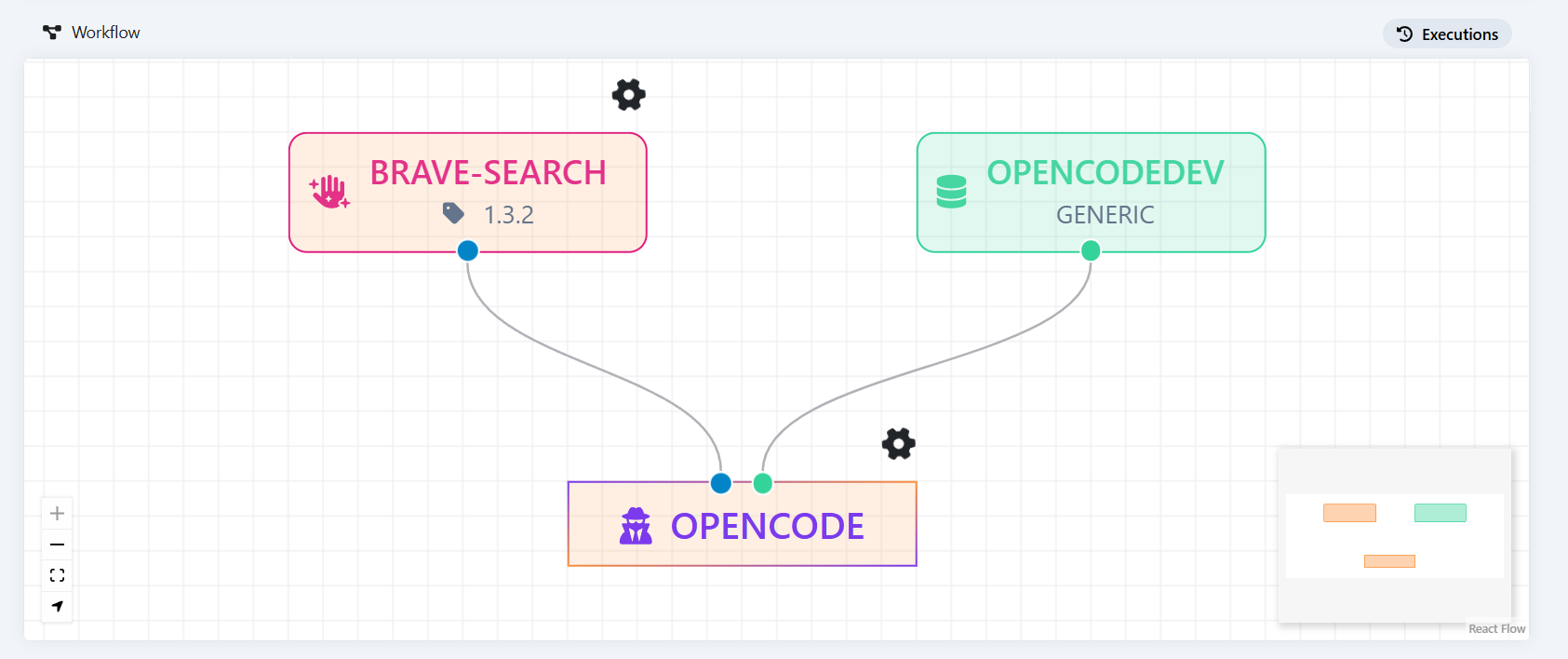
You can connect OpenCode to both datasets, which specialize the agent with instructions, skills, and tools, and remote MCP servers, which provide additional capabilities. Both are configured as input ports of dataset type, and the agent accepts multiple ports.
Dataset
During startup, OpenCode downloads the dataset and merges its files into /opencode, keeping their relative paths. To specialize the runtime, provide a dataset for the target domain.
The port is passed as --input-dataset (or --input-dataset-N for additional ports) with the S3 prefix, together with .s3_bucket, .s3_URL, .s3_ACCESS_KEY, .s3_SECRET_KEY and the optional .s3_REGION (default garage) and .use_ssl suffixes. Startup fails if a prefix contains no files.
A typical dataset structure is:
AGENTS.md
opencode.json
agents/
  domain-expert.md
skills/
  domain-workflow/
    SKILL.md
tools/
  domain-tool.ts
plugins/
  domain-plugin.ts
init.d/
  ...
reference-documentation.mdThe structure is entirely optional: you do not need to create or fill every folder. Include only the files you need; because each file is written to /opencode at its own path, a file with the same path is overwritten.
Dataset contents have distinct roles:
AGENTS.mdcontains shared, global instructions that guide the main agent and subagents.opencode.jsonis the OpenCode configuration: model and providers, local MCP servers, permissions, and instruction files. At startup it is extended with the MLflow plugin and the remote MCP servers connected as input ports. For more details, see Config | OpenCode.agents/contains Markdown files, one for each specialized subagent. Each file defines its role, expertise, and operating instructions, for example for a domain expert. For further examples of defining a subagent, see Agents | OpenCode.skills/contains reusable procedures. Each skill has its own folder and aSKILL.mdfile describing when to apply it and which steps to perform. For more details, see Agent skills | OpenCode.tools/contains custom tools the agent can invoke during a conversation. Tools are defined in JavaScript or TypeScript files and can run domain integrations or scripts. For more details, see Custom tools | OpenCode.plugins/contains JavaScript or TypeScript plugins that extend OpenCode through event hooks, for example to integrate external services, change agent behavior, or add tools. For more details, see Plugins | OpenCode.init.d/contains the scaffold copied into the working repository at startup; files already present in the repository are not overwritten. See the Service Writer scaffold for an example.- Domain reference documentation remains outside
agents/and is referenced by instructions or prompts as needed.
Prompts, skills, tools, auxiliary agents, and documentation in the dataset determine the agent's actual specialization. The same runtime can therefore be reused in different domains by changing the dataset.
MCP server
A port becomes a remote MCP server when --input-dataset-N.metadata holds JSON metadata whose datasetFileType.type is endpoint and whose datasetFileType.details.url is the server address:
--input-dataset-2.metadata='{"name":"my-mcp","datasetFileType":{"type":"endpoint","details":{"url":"http://host:8000"}}}'The server name is the slugified name field, and the URL is normalized to end with /mcp and checked for reachability before being added to the OpenCode configuration. A port with .metadata is never downloaded from S3.
OpenCode can use capabilities provided by an MCP server, including an ADK Agent. However, it cannot be used as an MCP server by ADK.
Example: ALIDA Service Writer
For the Service Writer, OpenCode works on a repository associated with the BDA and uses an ALIDA-focused dataset. The workflow generally includes:
- defining or updating
.alida/spec.md; - reading the relevant documentation;
- implementing the Service code;
- generating and validating
src/arguments.pyandmeta-model.json; - producing documentation and CI configuration;
- testing, committing, pushing, and opening a merge request after the pipeline succeeds.
At startup, OpenCode creates or clones a repository in the BDA namespace and, when MLflow is configured, creates or retrieves the corresponding MLflow experiment. The BDAID maintains the connection between the chat, artifacts, and operating context.
Startup behavior in detail:
- OpenCode runs in
/workspace; the service repository is cloned into/workspace/service, so every service path the agent writes starts withservice/. - If
GIT_URLis set, the repository is cloned and any missing mandatory files are copied into it. No GitLab project is created. - If
GIT_URLis empty, a GitLab project named after the slugifiedBDA_IDis created (or reused) in the group identified byGITLAB_GROUP, with default branchGIT_BRANCHordevelop. The project is then cloned and, if newly created, seeded with the initial service scaffold. - Git authentication uses
GITLAB_TOKENonly, over HTTP or HTTPS. - If
MLFLOW_TRACKING_URIis not set, the MLflow experiment is skipped and the agent runs without the@mlflow/opencodeplugin.
Service scaffold
The mandatory files come from /opencode/init.d (overridable with INIT_DIR). Each file is copied into the repository only if it does not already exist, so existing files are never overwritten. Because input datasets are merged into /opencode before the repository is prepared, a dataset can provide its own init.d/ to replace the scaffold.
.alida/
  spec.md
  iterations.md
src/
  main.py
  arguments.py
  utils.py
tests/
  .gitlab-ci-test.yml
  seed.py
  run_scenarios.py
.gitlab-ci.yml
Dockerfile
docker-compose.yml
documentation.md
meta-model.json
requirements.txtThe scaffold is a placeholder and is neither valid nor runnable as is: meta-model.json has an empty name and url, src/main.py contains no logic, docker-compose.yml has an empty command, and the test files contain FILL markers. An empty name tells the metamodel-writer subagent that the service is new (version 1.0.0). The agent rewrites these files during the operating cycle, and validate-metamodel passes only after that.
ALIDA dataset
The dataset determines what the coding agent knows and how it behaves. For the Service Writer, the ALIDA dataset provides ALIDA-specific prompts, skills, and the alida-documentation.md file.
Agent tools and operating cycle
The main agent instructed to develop ALIDA services has the following tools:
validate-metamodel: validatesmeta-model.jsonand itssrc/arguments.pyfile against the ALIDA services contract.generate-gitlab-ci: generates the standard ALIDA CI configuration, including the service-registration phase.commit-and-push-service: the only way the agent delivers a service. It embedsdocumentation.mdintometa-model.json:markDown.value(from which the platform obtains the manual displayed in the user interface), sets the version, validates the meta-model and refuses to commit if it is invalid, prepends the changelog entry to.alida/iterations.md, then commits and pushes tofeat/<service-name>after confirming the repository matchesGIT_URL. There is no standalone documentation-embedding tool.get_useful_info: returns deterministic information about the execution environment, including the current date, the active user and the GitLabproject_id.take-a-coffee: waits 10–300 seconds (default 30) between two pipeline checks, so the agent does not exhaust its polling budget while a job is still running.- gitlab-mcp: MCP server that lets the agent interact with GitLab. Only these tools are enabled:
list_pipelines,get_pipeline,list_pipeline_jobs,get_pipeline_job_output,list_merge_requests,create_merge_request,get_merge_request_conflicts,search_repositories,create_repository.
The ALIDA dataset also ships these skills:
write-service-tests: writes the CI end-to-end tests, with a seed and a scenario matrix (one baseline run plus one run per parameter, plus edge cases).brainstorming: turns a vague request into a settled, written specification before development starts.caveman: compressed response mode (lite,full,ultra) that reduces output tokens and persists for the session until turned off.
GitLab permissions
To commit, push, and create branches, the configured GitLab identity needs access to the group where the repository is written, with at least the Maintainer role: the Developer role is not sufficient to create branches.
The operating cycle starts with creating or reviewing .alida/spec.md, then reads ALIDA documentation related to the required integrations. The agent implements the service, delegates the generation of src/arguments.py and meta-model.json to the metamodel-writer subagent, validates the result, and delegates user-facing documentation to the documentation-writer subagent. It then generates CI configuration and writes end-to-end tests. Finally, commit-and-push-service embeds the documentation in the meta-model, records the iteration and publishes the feat/<service-name> branch; the agent waits for the pipeline, polling with take-a-coffee up to 20 times, and, if necessary, fixes pipeline errors. After successful validation, it opens a merge request. Merging into develop or dev starts service build and registration using the provided meta-model.json.
Reference documentation and validation
The agent reads ALIDA documentation from a read-only local copy in /opencode/docs, starting from /opencode/docs/index.md. It covers the service layout (core.md), the meta-model (meta-model.md), Spark (spark.md) and the port types in ports/ (dataset, model, stream, generic-io, rest, multiple, monitoring).
The validate-metamodel tool, also run by commit-and-push-service before committing, enforces these rules:
meta-model.jsonmust containname,version,description,accessLevel,mode,url,propertiesandmarkDownwith itsvalue.nameuses lowercase letters, digits and hyphens, cannot start or end with a hyphen, and is at most 30 characters.- Property
valueTypeis one ofSTRING,BOOLEAN,DOUBLE,JSON(there is noINT). - At most one property has
inputData: trueand at most one hasoutputData: true. - Every property except
assetsmust have a matching argument insrc/arguments.py. BOOLEANarguments usetype=str2bool(nottype=boolnorstore_true/store_false), andarguments.pymust definestr2bool;DOUBLEarguments usetype=floatortype=int.
Runtime configuration
- The model is set with the
OPENCODE_MODELenvironment variable (defaultopencode/musa-spark-1.3-free). A local Ollama provider athttp://localhost:11434/v1is also configured; theopenai,geminiandgitlabproviders are disabled. - At startup, the configuration is extended through
OPENCODE_CONFIG_CONTENTwith only the@mlflow/opencodeplugin (when MLflow is enabled) and the remote MCP servers discovered from the input ports. - Permissions: the agent can run shell commands and read any directory, cannot ask interactive questions, and cannot edit
/opencode/docsor/opencode/skills.AGENTS.mdis always loaded as instructions. - OpenCode is served with
opencode serveon port10000(overridable withOPENCODE_PORT), exposing its APIs and SSE stream. For browser clients that need CORS, the repository includes an optionalsse_proxy.jsthat listens on port3001and forwards/sse-proxy?target=<url>as an event stream and/http-proxy?target=<url>as plain HTTP.