Workflow Media Management in a Service Development
ALIDA provides Services with the ability to store Workflow Media generated by them within dedicated internal areas.
Workflow Media are multimedia contents such as:
- Generic files
- HTML pages
- Logs
- Images (e.g., graphs)
Workflow Media Arguments
For each Service, ALIDA will always and automatically pass a set of arguments containing the coordinates of these storage areas. These arguments can then be managed by the core program of the Service (see Example).
The arguments in question are the following:
| Argument | Value | |
|---|---|---|
--go_manager.base_path | path to the "folder" within the object store where files will be saved | (fixed) |
--go_manager.storage_type | s3 | (fixed) |
--go_manager.topic | notifications | (fixed) |
--go_manager.brokers | strimzi-kafka-brokers.strimzi-kafka.svc.cluster.local:9092 | (fixed) |
--go_manager.s3_URL | garage-s3-exposed.garage.svc.cluster.local:3900 | (fixed) |
--go_manager.s3_ACCESS_KEY | (redacted) | (fixed) |
--go_manager.s3_SECRET_KEY | (redacted) | (fixed) |
--go_manager.s3_REGION | '' | (fixed) |
--go_manager.s3_bucket | alida | (fixed) |
--go_manager.use_ssl | false | (fixed) |
Workflow Media Saving Procedure
If the multimedia content is of type Log, only the metadata must be sent to ALIDA's internal Kafka broker.
If the type is one of the others (Generic file, HTML page or Image), then:
- Save the file on S3
- Send the related metadata in JSON format to ALIDA's Kafka broker
To send the metadata, the core program must instantiate a Kafka producer.
The JSON message for the broker must have the following attributes always available:
| Attribute Name | Value |
|---|---|
| name | The content name. It will be shown on the UI |
| key | space-free string. (Internal reference to the Workflow Media) |
| uuid | UUIDv4. (Generated by the user) |
| messageType | picture | file | log | html |
| title | A title |
| description | A description |
| var | leave blank |
| serviceId | SERVICE_ID (global variable passed by ALIDA to the Service) |
| executionId | EXECUTION_ID (global variable passed by ALIDA to the Service) |
| hashToken | HASH_TOKEN (global variable passed by ALIDA to the Service) |
| created | datetime timestamp |
| modified | datetime timestamp |
| show | true | false |
Moreover, if messageType = log then:
| Attribute Name | Value |
|---|---|
| value | If messageType = log then:Numeric value or string to be displayedotherwise:blank |
| valueType | string |
otherwise if messageType != log:
| Attribute Name | Value |
|---|---|
| path | Leave blank if messageType = log, otherwise: File path (including file name) within the S3 internal bucket of ALIDA |
| extension | File extension (including the dot) (e.g. .csv, .html) |
| filename | File name + extension |
Example of Utility Functions in Python
# ... omitted ...

# Prepare base metadata message
def prepare_metadata_json(name, messageType):
    result = {
        "name": name,
        "key": name.lower().replace(" ", "-"),
        "uuid": str(uuid.uuid4()),
        "messageType": messageType,
        "created": str(datetime.now()),
        "modified": str(datetime.now())
    }

    # global variables automatically passed by ALIDA to the Service
    # go in the metadata message
    if "SERVICE_ID" in os.environ:
        result['serviceId']       = os.environ.get('SERVICE_ID')

    if "EXECUTION_ID" in os.environ:
        result['executionId']     = os.environ.get('EXECUTION_ID')

    if "HASH_TOKEN" in os.environ:
        result['hashToken'] = os.environ.get('HASH_TOKEN')

    return result

# For files
def prepare_file_metadata(name, messageType, path, extension, filename, **kwargs):
    # Preparing generic metadata message
    metadata              = prepare_metadata_json(name=name, messageType=messageType, **kwargs)
    metadata['path']      = path
    metadata['extension'] = extension

    if messageType == "picture":
        metadata['filename'] = filename

    return metadata

def upload_file_to_s3(s3_url, access_key, secret_key,region, bucket_name, object_name, local_file_path, secure=False):
  address = s3_url.replace("http://", "").replace("https://", "")
  client = Minio(address, access_key=access_key, secret_key=secret_key,region=region, secure=secure)
  client.fput_object(bucket_name, object_name, local_file_path)

# Sends metadata message to Kafka
def send_message(data, args):
    producer = _init_producer_kafka(args)
    producer.send(args.go_manager_topic, json.dumps(data).encode('utf-8'))
    producer.flush()

def send_application_media(file_to_send, file_name, file_type, args, **kwargs):
    folder = args.go_s3_path

    if folder[-1] != "/":
        folder = folder + "/"

    # Preparing metadata message for "files"
    metadata = prepare_file_metadata(
      name=file_to_send.split('.')[0],
      messageType=file_type,
      path=folder + file_name,
      extension=file_to_send.split('.')[-1],
      filename=file_name,
      **kwargs
    )

    # Uploading file to S3
    upload_file_to_s3(
      args.go_s3_url,
      args.go_access_key,
      args.go_secret_key,
      args.go_region_name,
      args.go_s3_bucket,
      folder + file_name,
      file_to_send,
      secure=args.
      go_use_ssl
    )

    # Sending metadata message to Kafka
    send_message(metadata, args)

def send_log(name, value, value_type, args, **kwargs):
    # Preparing generic metadata message
    message_to_sent               = prepare_metadata_json(name, "log", **kwargs)
    message_to_sent['value']      = value
    message_to_sent['valueType']  = value_type

    # Note: in the case of "logs", there is no file to upload to S3

    # Sending metadata message to Kafka
    send_message(message_to_sent, args)

# ... omitted ...Example of Service Code in Python for Sending Workflow Media
import argparse
import json

def str2json(string):
    return json.loads(string)

def str2bool(v):
    if isinstance(v, bool):
        return v
    if v.lower() in ('yes', 'true', 't', 'y', '1'):
        return True
    elif v.lower() in ('no', 'false', 'f', 'n', '0', ''):
        return False

parser = argparse.ArgumentParser()
json_example_ = {
    "test_size": 0.1,
    "train_size": 0.9,
    "random_state": 0,
    "shuffle": True,
    "stratify": None
}

parser.add_argument(
  "--json_example",
  help="json test.",
  type=str2json,
  default=json.dumps(json_example_)
)

parser.add_argument('--go_manager.brokers', dest='go_manager_brokers', type=str, required=True)
parser.add_argument('--go_manager.topic', dest='go_manager_topic', type=str, required=True)
parser.add_argument('--go_manager.base_path', dest='go_s3_path', type=str, required=True)
parser.add_argument('--go_manager.s3_bucket', dest='go_s3_bucket', type=str, required=True)
parser.add_argument('--go_manager.s3_URL', dest='go_s3_url', type=str, required=True)
parser.add_argument('--go_manager.s3_ACCESS_KEY', dest='go_access_key', type=str, required=True)
parser.add_argument('--go_manager.s3_SECRET_KEY', dest='go_secret_key', type=str, required=True)
parser.add_argument('--go_manager.s3_REGION', dest='go_region_name', type=str, required=True)
parser.add_argument('--go_manager.use_ssl', dest='go_use_ssl', type=str2bool, required=True)

args, unknown = parser.parse_known_args()from arguments import args
import json
import os
from utils import send_log, send_application_media
def process():
json_test = args.json_example
send_log("json_test_log", json_test, 'json', args)
send_log("test_log_int", 10, 'int', args)
send_log("test_log_float", 0.2, 'float', args)
send_log("test_log_str", "Hi there", 'string', args)
with open('data.json', 'w') as json_file:
json.dump(json_test, json_file)
send_application_media("data.json", "data.json", "file", args)
send_application_media("test.html", "test.html", "html", args)
send_application_media("image.png", "image.png", "picture", args)
send_application_media("gx.zip", "gx.zip", "file", args)
if __name__ == '__main__':
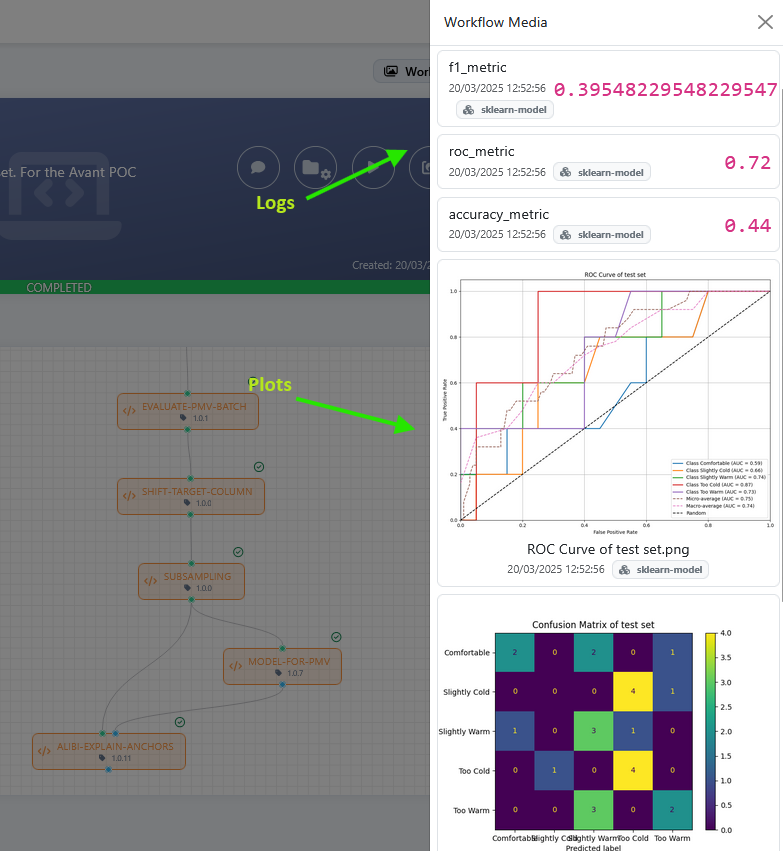
process()Once the Service has generated and sent the multimedia contents to ALIDA, these will be available from the user interface. The display mode of the content depends on its type:
- Generic files: available for download
- HTML pages: rendered within a separate tab
- Logs: displayed on the UI
- Images (e.g., graphs): rendered on the UI