ADK Agent
The ADK Agent is a long-running ALIDA service built with Google ADK. It exposes native ADK APIs and an OpenAI-compatible wrapper, and can be specialized through a prompt, skills, and connected services.
Dataset specialization
At startup, the ADK Agent discovers skills from an ALIDA MinIO dataset. A typical structure is:
skills/
  domain-workflow/
    SKILL.md
    references/
guide.mdOnly the skills/ subtree is downloaded. Its SKILL.md files define procedures the agent can use on demand; other dataset contents are not loaded. The same runtime can therefore be specialized for different domains by changing the dataset and restarting the agent.
Memory ADK Agent
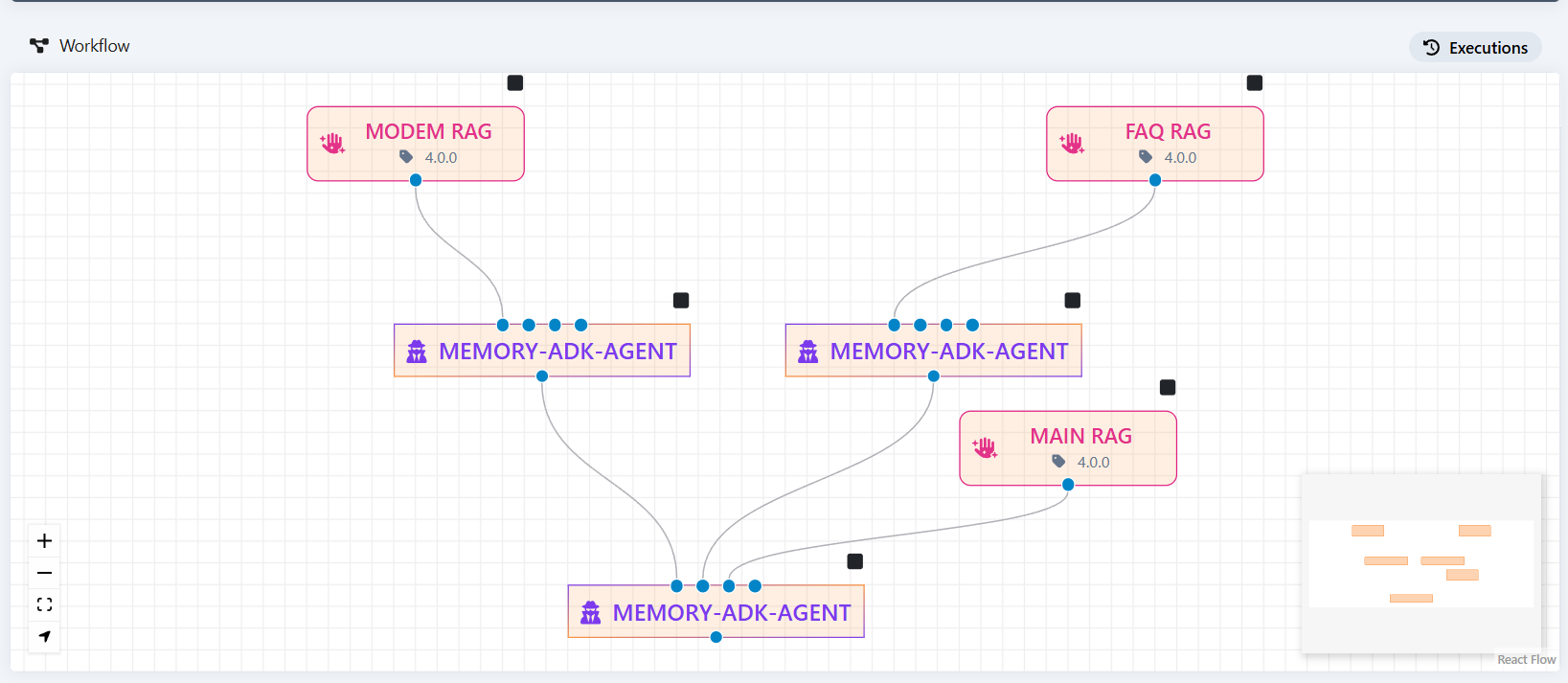
The Memory ADK Agent is an example of this runtime. It keeps conversational state and user details, connects to ALIDA services exposed as MCP servers (such as BraveSearch or GitLab), and can delegate to remote ADK agents via A2A agent cards. It also exposes an MCP server that agents such as the OpenCode agent can use.
Memory Agent dataset specialization
Connect a MinIO dataset to the agent's input-dataset port in the workflow. Each skill has its own directory and a SKILL.md file describing when to apply it. For example, skills/domain-workflow/SKILL.md can contain:
---
name: domain-workflow
description: Apply domain-specific steps to a task.
---

Follow the steps in references/guide.md for this task.At startup, the agent downloads the dataset's skills/ subtree, including references within each skill, into SKILLS_DIR and registers valid skills with ADK. The default directory is src/agents/memory_agent/skills/; for local development, place skill folders there or configure another SKILLS_DIR. If a dataset cannot be reached, the agent logs the error and starts without those skills.
The agent can have multiple dataset input ports, connecting it to different capabilities:
| Input | How it is used |
|---|---|
MinIO dataset containing skills/ | Downloads skills at startup. |
| Endpoint dataset pointing to an MCP server | Makes the server's tools available to the agent. |
Endpoint dataset whose URL ends in /.well-known/agent-card.json | Discovers a remote A2A agent and registers it as a sub-agent. |
Endpoint dataset URLs ending in /.well-known/agent-card.json are handled as A2A agent cards; other endpoint URLs are treated as MCP servers. For local development, MCP servers can also be configured with MCP_SERVERS.
Agent tools and operating cycle
The Memory ADK Agent can use:
get_usernameandupdate_usernameto retrieve or change the user's saved name;- skills loaded from the dataset, tools from connected MCP servers, and remote A2A sub-agents.
At startup, it registers the available skills and connections. During a conversation, it selects capabilities according to its configured instruction and the user's request; session state is stored by the configured ADK session service. The agent can be invoked through its native ADK APIs or through its OpenAI-compatible wrapper.
Configuration
The service form exposes the following fields:
| Field | Required | Description |
|---|---|---|
MODEL | Yes | Model name served by BASE_URL. |
TEMPERATURE | Yes | Sampling temperature. |
MAX_TOKENS | No | Maximum tokens per response. |
BASE_URL | Yes | OpenAI-compatible endpoint; defaults to the MLflow AI Gateway. |
API_KEY | Yes | Key for BASE_URL. |
AGENT_INSTRUCTION | Yes | JSON with prompt, name and description. name must be a valid Python identifier: it is the ADK application name, the model of the OpenAI-compatible API and the /a2a/<name> path of the agent card. |
DATABASE_URL | Yes | Database used by the ADK session service. |
Tracing to MLflow needs no configuration: the platform provides MLFLOW_TRACKING_URI, and traces are recorded in the experiment named after FATHER_ID (falling back to BDA_ID) unless MLFLOW_EXPERIMENT_NAME is set. A generic OpenTelemetry collector can be added with OTEL_EXPORTER_OTLP_ENDPOINT; TELEMETRY_BACKEND (auto, none, mlflow, otlp) selects which backends are active.
Invoke the agent
The native ADK APIs let you invoke the agent directly and manage its sessions and state. Copy the running agent's base URL from the Workflow Designer into AGENT_URL (without /v1), and replace memory_agent with the name set in AGENT_INSTRUCTION. Create the session before the first /run request:
curl -X POST "$AGENT_URL/apps/memory_agent/users/alice/sessions/session-001"Then send a message:
curl -X POST "$AGENT_URL/run" \
	-H "Content-Type: application/json" \
	-d '{
		"appName": "memory_agent",
		"userId": "alice",
		"sessionId": "session-001",
		"newMessage": {
			"role": "user",
			"parts": [{"text": "What is my name?"}]
		}
}'The OpenAI wrapper lets you use clients and interfaces already compatible with this standard, such as Open WebUI and LangChain. To obtain the available models:
curl "$AGENT_URL/v1/models"To send a message through the OpenAI-compatible /v1/chat/completions endpoint:
curl -X POST "$AGENT_URL/v1/chat/completions" \
	-H "Content-Type: application/json" \
	-d '{
		"model": "memory_agent",
		"messages": [
			{"role": "user", "content": "What is my name?"}
		],
		"user": "alice",
		"session_id": "session-001"
}'The additional user and session_id fields are not part of the OpenAI standard: the wrapper uses them to associate the request with a user and retain conversational memory. The wrapper creates the session if needed, so the native session-creation call above is unnecessary here. Keep both fields consistent across requests to continue the same conversation.
To receive responses incrementally, include "stream": true in the OpenAI-compatible request. The endpoint returns Server-Sent Events (SSE) with text deltas; when the model provides reasoning, streaming chat deltas include it in reasoning (and reasoning_content for older clients):
curl -N -X POST "$AGENT_URL/v1/chat/completions" \
	-H "Content-Type: application/json" \
	-d '{
		"model": "memory_agent",
		"messages": [{"role": "user", "content": "What is my name?"}],
		"user": "alice",
		"session_id": "session-001",
		"stream": true
}'When connecting the agent to the ALIDA chat, use the platform streamingUrl described in Configure an agent in chat; it is distinct from the /v1/chat/completions URL used for direct SSE requests.
Agent development UI
The agent development UI is available at the BDA URL with the /dev-ui/ suffix:
https://<alida-instance-url>/events/bda/<bda-id>/<service-id>/dev-ui/For example:
https://alida.devng.alidalab.it/events/bda/8344/8370/dev-ui/Trailing slash required
The UI URL must end with /. The address without a trailing slash might not load interface resources correctly.
After deploying and starting the agent, connect its OpenAI-compatible endpoint to the BDA chat by following Configure an agent in chat. For request tracing and governance, see Observability with MLflow.