
Model Deployment and Usage
ALIDA allows you to deploy models produced by Services and query them through a REST endpoint exposed by the platform, without any infrastructure configuration required on the user's side.
Model Detail Page
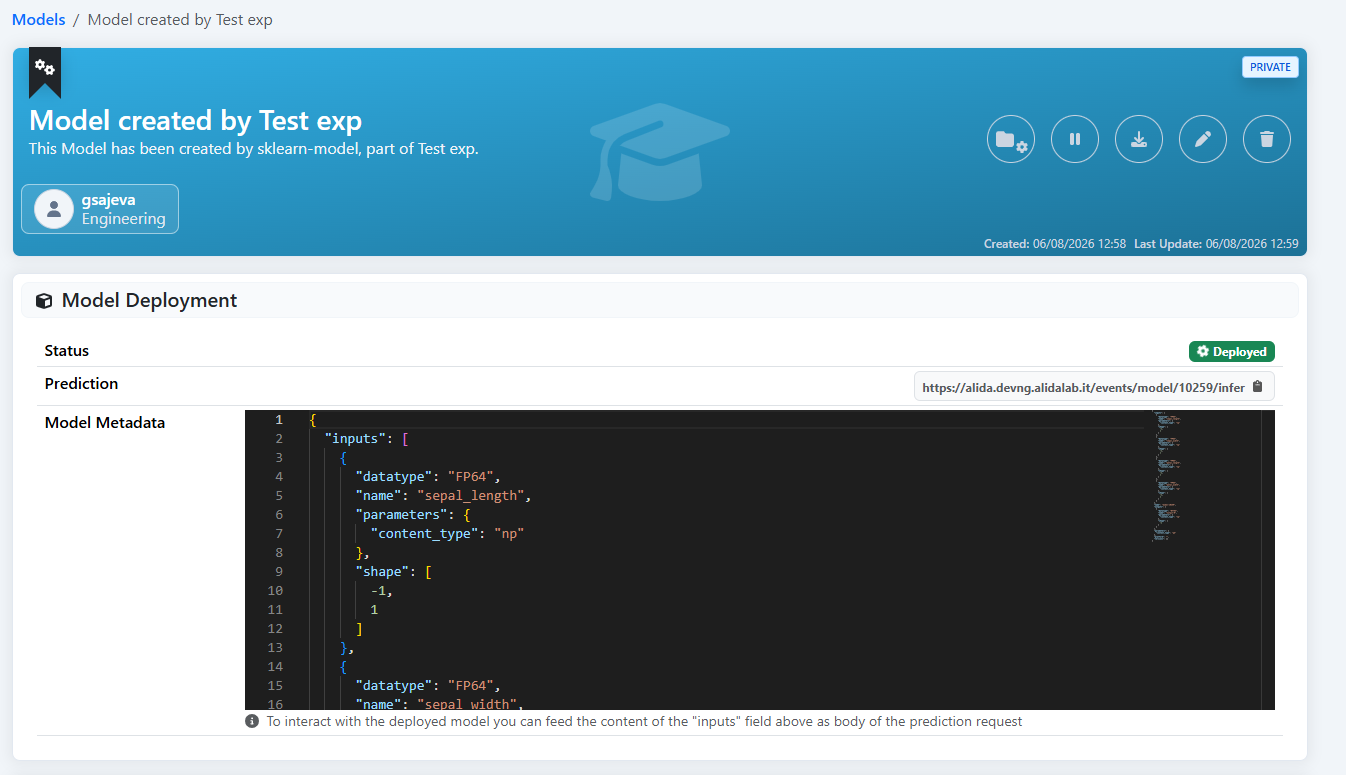
To access the detail page of a model, navigate to Data Management → Model from the side menu and click on the desired model card.
The detail page shows, among other information, the Model Deployment section, which displays:
- Status — current deployment status (
Deployed/ not deployed) - Prediction — inference endpoint URL (visible only when the model is deployed)
- Model Metadata — JSON schema of the model's exposed inputs and outputs, to be used for building inference requests
Deploying a Model
From the model detail page, click the  button in the top right bar.
ALIDA automatically downloads the model artifacts from storage and makes them available to the inference runtime. Once the process is complete, the Status in the Model Deployment section becomes Deployed and the endpoint URL is visible in the Prediction field.
!!! note "Note" The deploy button is only available for models produced by Services configured to support serving. If the button is not present, contact the developer responsible for the Service.
To stop serving a model, click the pause button  in the same bar.
Metadata Endpoint
Once deployed, you can query the model's metadata endpoint to obtain the input/output schema in JSON format. The URL is the same as the Prediction field but without /infer:
GET https://<namespace>.alidalab.it/events/model/<id>The response contains the same fields visible in the Model Metadata section of the detail page.
Querying the Model
The inference endpoint exposed by ALIDA accepts requests in V2 Inference Protocol format. The URL is visible in the Prediction field of the model detail page:
POST https://<namespace>.alidalab.it/events/model/<id>/inferReading the Model Metadata
Before building an inference request, carefully read the Model Metadata field on the model detail page (or query the metadata endpoint described above). It contains the complete schema of the model's inputs and outputs in JSON format.
Inputs — each element of the inputs array describes a feature accepted by the model:
name— feature name, to be used exactly as-is in the requestdatatype— V2 data type (e.g.FP64,FP32,INT64,BYTES)shape— tensor dimensions; the first value is-1as a placeholder for the number of samples (batch size). In the actual request, replace-1with the real number of samples you want to sendparameters.content_type— (if present) indicates how MLServer decodes the input data before passing it to the model:np: data is interpreted as anumpy.ndarray;shapeis used to reconstruct the tensor shape from thedatafield (which is always flat in the V2 protocol)pd: inputs are aggregated into apandas.DataFrame, where each input name becomes a column name; typical for tabular models with mixed types or column-name-based transformationsstr: data is interpreted as UTF-8 stringsbase64: data is interpreted as base64-encoded bytesdatetime: data is interpreted as ISO 8601 dates
The content_type can be specified at request level (applies to all inputs) or at individual input level. Content types explicitly specified in the request always take precedence over those defined in the model's metadata. If the metadata defines a content_type and the request does not specify one, the metadata value is used as the default.
Outputs — each element of the outputs array describes an available model output. The outputs field represents the contract exposed by the model: only the outputs declared there can be requested. If the model exposes multiple outputs, you can choose which one to request in the inference call. If nothing is specified in the request, the default output is returned.
Model Metadata example:
{
  "inputs": [
    {
      "name": "sepal_length",
      "datatype": "FP64",
      "shape": [-1]
    },
    {
      "name": "sepal_width",
      "datatype": "FP64",
      "shape": [-1]
    }
  ],
  "outputs": [
    { "name": "predict",       "datatype": "INT64", "shape": [-1, 1] },
    { "name": "predict_proba", "datatype": "FP64",  "shape": [-1, 3] }
  ]
}This model accepts two numeric features and exposes two outputs: the predicted class (predict) and the probabilities for each of the 3 classes (predict_proba). To send a single sample, replace -1 with 1 in all input shapes.
Obtaining an API Key
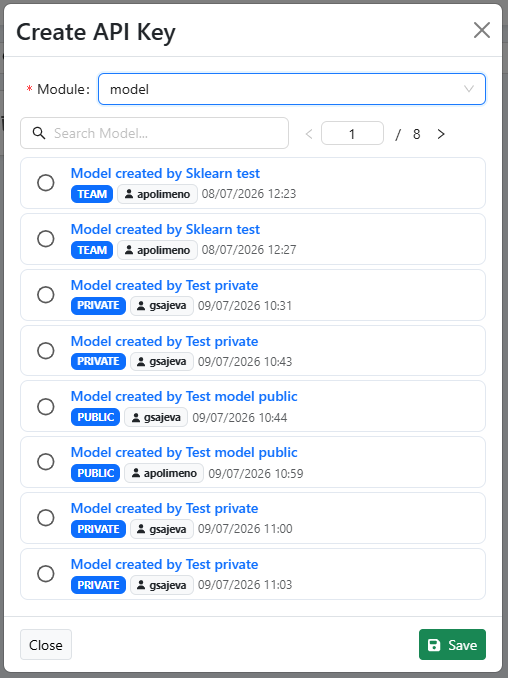
To query a deployed model from outside the platform, an ALIDA API Key is required. To create one:
- Access the API Key section from the side menu
- Click + Create API Key
- Select:
- Module:
model - Role: the specific model you want to query
- Module:
- Click Save and store the generated key
!!! warning "Warning" The key is shown only once at creation time. Store it carefully: it will not be possible to view it again afterwards.
Building the Request
The request contains three main fields:
inputs— array of inputs, each withname,shape,datatype,dataand optionallyparameters.content_type. Copy thename,datatypeandparametersfields from the metadata; replace the-1inshapewith the number of samples; provide the values in thedatafield.outputs— (optional) array of requested outputs. If omitted, the default output is returned. If present, specify{ "name": "<output-name>" }for each desired output among those declared in the metadata.parameters— (optional) request-level parameters, for example"content_type": "pd"to aggregate all inputs into a DataFrame.
Request Examples
Single sample, default output:
curl -X POST \
  "https://<namespace>.alidalab.it/events/model/<id>/infer" \
  --header "Authorization: Apikey <api-key>" \
  --header "Content-Type: application/json" \
  --data '{
    "inputs": [
      {
        "name": "sepal_length",
        "datatype": "FP64",
        "shape": [1],
        "data": [5.1]
      },
      {
        "name": "sepal_width",
        "datatype": "FP64",
        "shape": [1],
        "data": [3.5]
      }
    ]
}'Single sample, specific output (predict_proba):
curl -X POST \
  "https://<namespace>.alidalab.it/events/model/<id>/infer" \
  --header "Authorization: Apikey <api-key>" \
  --header "Content-Type: application/json" \
  --data '{
    "inputs": [
      {
        "name": "sepal_length",
        "datatype": "FP64",
        "shape": [1],
        "data": [5.1]
      },
      {
        "name": "sepal_width",
        "datatype": "FP64",
        "shape": [1],
        "data": [3.5]
      }
    ],
    "outputs": [
      { "name": "predict_proba" }
    ]
}'Batch (3 samples), default output:
curl -X POST \
  "https://<namespace>.alidalab.it/events/model/<id>/infer" \
  --header "Authorization: Apikey <api-key>" \
  --header "Content-Type: application/json" \
  --data '{
    "inputs": [
      {
        "name": "sepal_length",
        "datatype": "FP64",
        "shape": [3],
        "data": [5.1, 6.3, 4.7]
      },
      {
        "name": "sepal_width",
        "datatype": "FP64",
        "shape": [3],
        "data": [3.5, 2.8, 3.2]
      }
    ]
}'Response Examples
Default output (predict), single sample:
{
  "model_name": "model-<id>",
  "outputs": [
    {
      "name": "predict",
      "shape": [1, 1],
      "datatype": "INT64",
      "data": [0]
    }
  ]
}predict_proba explicitly requested, single sample (3 classes):
{
  "model_name": "model-<id>",
  "outputs": [
    {
      "name": "predict_proba",
      "shape": [1, 3],
      "datatype": "FP64",
      "data": [0.85, 0.10, 0.05]
    }
  ]
}Batch (3 samples), default output:
{
  "model_name": "model-<id>",
  "outputs": [
    {
      "name": "predict",
      "shape": [3, 1],
      "datatype": "INT64",
      "data": [0, 2, 1]
    }
  ]
}The data field in the output contains one prediction per sample sent. The names of the available outputs and their meaning are described in the documentation of the Service that produced the model.